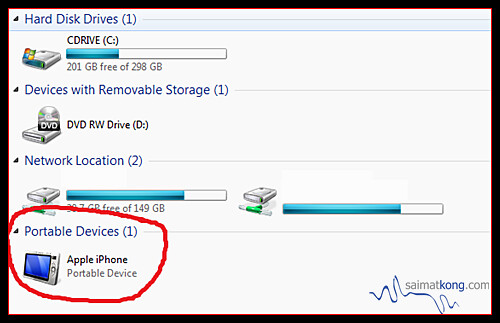

This is one of the problem related to my iPhone 4 I had been facing, now the iPhone data cable had become quite old but it is properly functional, I started facing this issue on and off. When my iPhone even after proper connection with the USB cable with computer, it does not appear with the other drives in My Computer.
Now my iPhone does not show up under my computer with the drives and does not display as drive in my computer. This issue bothering me as I cannot transfer my camera captured pictures on my iPhone in the camera roll folder to my computer hard disk. I have 10k over photos & videos and it’s hogging up my iPhone storage which need to be cleared.
Here are all the possible solutions to the iPhone not detecting in my computer
Fix:
Method 1: Fixing Mobile Device Driver Service
1. Open Start Menu >> Run and type services.msc and press ok [ this will open up services ]
2. Locate the service named Mobile Device Driver
3. Double click the service to open properties
4. In the “general” tab find the “startup type” drop-down arrow menu and make sure “automatic” is selected.
5. Also see the general tab to check the “service status”. If it does not say “started” then click the start button to start the service and connect your phone again and click apply.
Note: If the above procedure does not helped in your case, then try restarting the service
Method 2: Solve Through Device Manager
1. Go to My Computer >> Manage and click Device Manager in the left tab.
2. Click Portable Devices >> Apple iPhone >> Uninstall
3. Unplug and plug your iPhone, now wait for windows to re recognize your iphone [ In Device Manager, you will see the new recognized Apple Iphone ]
4. Press F5 to refresh your windows explorer and your Apple iPhone will show up with a camera icon.
Method 3 : Use iPhone file browser for Windows
Follow the procedure to do the same, make sure that your iphone is connected to your computer with iphone data cable
1. Download DiskAid which is a free iPhone Explorer [ Lets you explore your iphone files and folder ]
2. Install and Run DiskAid it will automatically detect iphone and navigate to the camera photos folder on your iphone
root >> var >> mobile >> media >> DCIM >> 100APPLE or XXXAPPLE folder.
3. Right click any image and select Copy to PC and select a folder to copy these images, that’s it . This way you can copy the images from iPhone camera roll folder when you iPhone does not show in my computer.
Oohh yeah, another iOS problem! Someone discovered a method to bypass the passcode lock on any iPhone running the newest software update iOS 6.1.
The method is a bit complicated and will allow access to the phone application! While hitting the home button will re-lock the phone, the exploit does have potential to snoop through peoples contacts and make calls. How creepy it is!
Apple never do enough testing or it’s injected this bug on purpose?
Steps on how to hack / bypass iOS 6.1 passcord lock.
1. Lock device
2. Slide to unlock
3. Tap emergency call
4. Hold sleep button until the power down prompt shows. Click cancel, you will notice the status bar turn blue. Type in 911 or your emergency number and click call then cancel it asap so the call dosen’t go through.
5. Lock your device with the sleep button then turn it on using the home button.
6. Slide to unlock then hold the sleep button and in 3 seconds tap emergency call. This will spazz out the phone and cause it to open.
[Make sure to continuously hold the sleep button until you are done looking in the phone]
And there you go, the phone will reveal its contact, call, and voicemail information. You can also create a contact and view the photo gallery in doing so. You can also send emails and texts through the sharing a contact feature.
Update: One MacRumors reader notes that the technique does not appear to work if the user has turned off the “simple passcode” option to allow for more complex passcodes.
Update 2: AllThingsD notes that while Apple has yet to make an official comment on the issue, “sources close to the company say it is hard at work on a fix.”
Update 3: AllThingsD has now updated its report with a response from Apple.
“Apple takes user security very seriously” spokeswoman Trudy Muller told AllThingsD. “We are aware of this issue, and will deliver a fix in a future software update.”
–
Breaking News!
A strange vehicle caught on camera in tunnel in Germany.
When the footage is slowed down, we see a strange light that seems to be chasing after it. According to the report, the vehicle could be the missing cargo that was reported a few days before.
It’s clear the missing cargo is in fact a car. But what kind of car could possibly cause all this drama?
Apple on Monday released its first major update to iOS 6.1, the latest update to its mobile operating system. The iOS 6.1 update includes a number of minor changes to the software.
The update brings LTE compatibility to 36 new iPhone carriers and 23 new iPad carriers around the world, allowing users of compatible devices : the iPhone 5, fourth-generation iPads, and iPad mini, to take advantage of the faster wireless speeds.
In addition to the LTE upgrades, Apple also tweaked two of its services: iTunes Match and Siri.
Users of iOS 6 who were disappointed by the removal of the ability to download individual songs to their iOS device will be utterly delighted to find that it’s been restored as of this update.
Siri’s picked up a welcome new skill: You can now use Apple’s virtual assistant to purchase movie tickets via Fandango. That feature’s only available in the U.S., however, and requires that you have the app installed—if you don’t, Siri will prompt you to do so, much as it does with OpenTable.
Passbook gets a slight tweak as well: The introductory screen that lets you visit the App Store’s selection of Passbook-enabled software is now its own “pass,” meaning it doesn’t disappear once you add your first digital pass. That way, you can always have access to the App Store collection. (You can, however, delete the pass like any other, if you prefer.)
This attractive button now lets you reset the token used to identify you to advertisers.
There’s also a new button that lets you reset the Advertising Identifier, which you can find under “Settings -> General -> About -> Advertising”. What is the Advertising Identifier?
“iOS 6 introduces the Advertising Identifier, a non-permanent, non-personal, device identifier, that apps will use to give you more control over advertisers’ ability to use tracking methods. You can reset a device’s Advertising Identifier at any time. And, if you choose to limit ad tracking, apps are not permitted to use the Advertising Identifier to serve you targeted ads. In the future all apps will be required to use the Advertising Identifier. However, until then you may still receive targeted ads.”
Apple’s also included a variety of security fixes in version 6.1, including for WebKit, Wi-Fi, and other services. To update your device to iOS 6.1, navigate to Settings -> General -> Software Update and tap Download and Install.
The all new iPhone 5 has finally arrived in Malaysia and as expected, the launch by Maxis was MASSIVE and it drew a huge crowd even at the midnight! It took place at Pikom ICT Mall CapSquare last week on 14th December and the event started at about 7pm at 13th December night and till the next day!
This was where the Maxis iPhone 5 launch happened! Hmm there’s nothing much inside CapSquare and it’s like how the start of the famous gadget IT MALL, Lowyat Plaza. Hopefully CapSquare able to sail thru the storm and become the next popular gadget mall one day!
Suren J. Amarasekera : Joint Chief Operating Officer
T. Kugan : Head of Product, Device, Innovation and Roaming
T. Kugan presented the iPhone 5 and walk through some slides detailing the new Maxis plans as well as some of the Maxis Rewards Applications which provides Maxis customers special services, privileges, discounts vouchers and more.
There’s also a newly introduced “Cloud based storage system for the iPhone 5″ called Loker and it has 10GB free space for all Maxis users who signs for the phone.
Maxis also introduced a super affordable plan, the iValue 50. This plan basically allows everyone to own an iPhone 5 as the plan only costs RM50 a month which is very affordable!
Maxis going to create another history with this iPhone 5!
All equipped with their Apple products or gadgets while waiting for the launch and waiting for the iPhone 5 to be landed in their hand!
Don’t worry about your phone running low batt, there’s plenty of charging station here prepared specially for you while waiting for the launch! #maxis5
Fear not! There’s 45 payment counters and 9 collection counters by alphabetical order! Even thought there’s so many counters and part time workers, the process still very slow as there’s a lot of manual input need to key into the system I believe? Some have to wait at least 3-5 hours to get their phone!
All waiting for the clock to strike 00:00:00 to grab their iPhone 5!
The 1st in the queue for iPhone 5 launch! He’s been there since 12 hours ago till the launch! This is because he wanted iPhone 5 so badly and the launch day was actually his birthday! It’s really a truly amazing gift!
It’s been a week since the launch of iPhone 5 in Malaysia by all the telco (Maxis, Digi, Celcom), have you grab one yourself yet? If yes, what’s your package and how do you fine the new iPhone 5?
Oooh yah! I have seen some friends reported that there’s tiny hairline scratches on the new iPhone 5 and even the iPad Mini! Damn! Also they are not allow to change due to this scratches, it’s factory defect right?! Hopefully no one will get these scratched unit!
You know most smartphone plans from telcos are generally more expensive and packed with a rather huge amount of data, free calls, free SMS and free MMS for cheaper phone?
Those plans are good of course and it’s a deal if you utilize up everything that is bundled together, but what if you are one of those lite users who rely on VoIP and free messaging services such as Whatsapp? Then you are probably paying through your nose! I’m one of them!
It’s good that Maxis recently introduced a new iValue Simple at only RM50 a month and it comes with 1GB of data, 200 minutes of local calls to all operators and only 100 SMS to Maxis only!. Call charges will start from 12sen/min Maxis to Maxis while SMS charges are as low as 5sen/SMS Maxis to Maxis.
Maxis will have you spoilt for choice with the introduction of these convenient and irresistibly affordable iValue Plans. For affordable monthly fees, enjoy an array of excellent services to enhance your online experience.
Hmm one question I would love to know is that what happen to the all the existing value customers? Is that all the telcos take all the existing customers lightly and only value the new customer?
Those iValue 1 customers from iPhone 4 era will still getting old package which is much less deal then the current offered package? 2GB data and 1000mins free calls and 800 free sms??
iPhone 5 will be launching midnight 12am 14th @ PIKOM ICT Mall in Capsquare, Kuala Lumpur
Telco in Malaysia have started opening up Registration of Interest for the new iPhone 5 after Apple made the official announcement that the latest iPhone will be available in more than 50 countries this month on 14th December.
I just got an email from Maxis telling me that The Brand New iPhone 5 Coming Soon!
All operators should be start selling the device from midnight December 14. You can register for your iPhone 5 from Maxis here. Remember that, if you register now you might be the 1st among Malaysian to get it!
Don’t go back empty handed on 14/12 if you don’t register your interest and end up in the long queue and might not have enough stocks.
I already registered my interest! Lolz, only register but don’t think have the luxury to own it for now
Oooh yeah! Are you one of the Apple fan out there and been waiting very eagerly for the iPhone 5 launch in Malaysia? You do not need to wait any longer! iPhone 5 is here very soon!
Hehe, maybe some of you already got a unit of iPhone 5 from Singapore or online? ;p
When will the iPhone 5 come to Malaysia?
There’s so many speculation and rumors out there of Maxis will be launching soon and now it’s Digi turn to speculate about the the iPhone 5 launch in Malaysia?
I have seen that a screen captured in the 1 Utama Shopping Centre events listing, DiGi has booked a spot from 14th to the 18th November for “DiGi Roadshow promoting DiGi latest packages” but when I checked again in the 1 Utama event listing it’s now changed to 28th November to 30th November!
1 Utama’s website indicating that Digi will be organizing an “Digi Roadshow promoting Digi latest packages” from November 28 to November 30.
Other local telcos like Maxis, Celcom would certainly launch iPhone 5 at the same time.
Now we are just waiting for the official announcements and hopefully there will be a “iPhone 5 Pre-Order” or “iPhone 5 Registration of interest” by all the Telcos in Malaysia and this will reduce the mass crowds and avoid any unhappy events that might happen during the launch.
The iPhone 5 price shouldn’t be much different from the prices of the iPhone 4S and packages when it was first released here in Malaysia.
Oooh yeah! Are you one of the Apple fan out there and been waiting very eagerly for the iPhone 5 launch in Malaysia? You do not need to wait any longer! iPhone 5 is here very soon!
Hehe, maybe some of you already got a unit of iPhone 5 from Singapore or online? ;p
When will the iPhone 5 come to Malaysia?
Mid Valley’s website indicating that Maxis will be organizing an “iPhone 5 promotion” from November 5 to November 11.
Some media friends claimed that their sources tell them that the Malaysia iPhone 5 launch date is 2nd November. While we cannot confirm the date just yet as there’s still no news from the telco or no invites yet!
On the other hand, there’s no news or listing in the official KLCC’s website suggesting the KLCC as the venue for the iPhone 5 launching event yet.
Anyhow, as long as Maxis does not withdraw the Mid Valley venue booking, Malaysians will be able to buy Maxis iPhone 5 in November 2012. Other local telcos like DiGi, Celcom would certainly launch iPhone 5 at the same time.
Now we are just waiting for the official announcements and hopefully there will be a “iPhone 5 Pre-Order” or “iPhone 5 Registration of interest” by all the Telcos in Malaysia and this will reduce the mass crowds and avoid any unhappy events that might happen during the launch.
The iPhone 5 price shouldn’t be much different from the prices of the iPhone 4S and packages when it was first released here in Malaysia.
Updates!
Mid Valley’s event listing actually updated it to “Maxis One Club Promotion” instead of “iPhone 5 promotion”!
Update your iPhone, iPad, or iPod touch with the latest iOS 6 for more features, best iPhone experience. Connect iPhone & follow onscreen instructions in iTunes. If you are on iOS 5 then you may just go the the Settings > General > Software Update and update to iOS 6 OTA “Over The Air” upgrade, meaning no connection to iTunes is required at 599MB.
iOS 6 gives you more features to make the things you do every day even better. It’s free and easy to upgrade wirelessly on your iPhone, iPad, or iPod touch.
iOS6 – Map take a whole new turn
Beautifully designed from the ground up (and the sky down), Maps changes the way you see the world. Map elements are vector based, so graphics and text are incredibly detailed — even when you zoom all the way in — and panning is smooth.
Tilt and rotate to view an area, and Maps keeps the names of streets and places where they belong. Get visual and spoken turn-by-turn navigation and real-time traffic updates. Even soar over cityscapes to see the sights from the air in amazing, high-resolution quality. Learn more about Maps
iOS6 – Siri. Sports. Restaurants. Movies. Now ask even more of Siri.
With iOS 6, Siri understands more languages and works in more countries.2 So you can get more things done in more places around the world. Want to know the latest scores and stats for your favorite teams and players? Thanks to iOS 6, Siri knows the answers. Or maybe it’s movie night. Siri can show you the latest reviews and showtimes.
Find the best restaurants in town and make reservations. Even have Siri open your apps for you — no tapping required. Say “Launch Flight Tracker” or “Open Angry Birds” and Siri does just that. You can also use Siri to post Facebook updates and tweet for you. Learn more about Siri
iOS6- Facebook. Integrated throughout iOS. You’ll definitely Like it.
Now it’s easier than ever to interact with the world’s largest social network. And there’s no need to leave your app to do it. Share a photo to Facebook right from Camera or Photos. Post your location right from Maps. Brag about a high score right from Game Center. If you have your hands full, just ask Siri to post for you.
You need to sign in to Facebook only once, and you’ll be off and sharing. Never miss another birthday or get-together, since Facebook events are integrated into Calendar. And your Facebook friends’ profile information is integrated into Contacts, so when they update an email address or phone number you automatically stay up to date. Now that’s something to post about.
Share photos from the Camera app, locations from Maps, links from Safari, high scores from Game Center, and more. Or post a status update from Notification Center or with Siri.
iOS6 – Shared Photo Streams. Share select Photos with a select audience.
Now you can share just the photos you want, with just the people you choose. Simply select photos from the Photos app, tap the Share button, choose who you want to share your photos with, and they’re on their way. Friends using iCloud on an iOS 6 device or a Mac running Mountain Lion get the photos delivered immediately in the Photos app or iPhoto.
You can even view Shared Photo Streams on Apple TV. If the folks you’re sharing with aren’t using an Apple device, they can view your photos on the web. People can like individual photos and make comments. And you can share as much as you want: Your Shared Photo Streams don’t count against your iCloud storage, and they work over Wi-Fi and cellular networks.
iOS6 – Passbook. Just ticket. And the boarding pass, card, and coupon.
Your boarding passes, movie tickets, retail coupons, loyalty cards, and more are now all in one place. With Passbook, you can scan your iPhone or iPod touch to check in for a flight, get into a movie, and redeem a coupon. You can also see when your coupons expire, where your concert seats are, and the balance left on that all-important coffee bar card.
Wake your iPhone or iPod touch, and passes appear on your Lock screen at the appropriate time and place — like when you reach the airport or walk into the store to redeem your gift card or coupon. And if your gate changes after you’ve checked in for your flight, Passbook will even alert you to make sure you’re not relaxing in the wrong terminal.
No more hunting through your wallet for gift cards, coupons, passes, or tickets. Passbook keeps everything organized — and handy.
iOS6 – FaceTime. Look who’s talking. Over cellular.
FaceTime now works over cellular networks as well as Wi-Fi, so you can make and receive FaceTime calls wherever you happen to be.3 You can even make and receive FaceTime calls on your iPad using your phone number. That means you can use FaceTime wherever you are, on any device. And never miss another wink, smile, air kiss, or eye roll.
iOS6 – Phone. Send to voicemail. Reply with message. Remind me later. It’s your call.
iOS 6 adds new calling features to your iPhone. Now when you decline an incoming call, you can instantly reply with a text message or set a callback reminder. And when things are just too hectic, turn on Do Not Disturb and you won’t be bothered by anyone — except can’t-miss contacts like your boss or your better half.
iOS6 – Mail. An even better email experience. Delivered.
Redesigned with a more streamlined interface for easier reading and writing, Mail in iOS 6 lets you set up a VIP list so you’ll never miss an important message from your accountant, your boss, or your BFF. It’s even easier to add photos and videos to email messages. And to refresh your mailboxes, all you have to do is swipe down.
iOS6- Safari. Browsing is just the begining.
iOS 6 brings even better web browsing to your iPhone, iPad, and iPod touch. iCloud Tabs keeps track of which pages you have open on your devices, so you can start browsing on one device and pick up right where you left off, on whatever device is handy. Safari now saves web pages — not just links — in your Reading List, so you can catch up on your reading even when you can’t connect to the Internet.
And when you’re posting a photo or video to eBay, Craigslist, or another site, you can take photos and video — or choose from your Camera Roll — without leaving Safari. When you really want to see the whole picture, turn your iPhone or iPod touch to landscape and tap the full-screen icon to view web pages without distractions.
iOS6 – Accessibility. iOS6 comes with Guided Access.
iOS 6 comes with even more features to make it easier for people with vision, hearing, learning, and mobility disabilities to get the most from their iOS devices. Guided Access helps students with disabilities such as autism remain on task and focused on content. It allows a parent, teacher, or administrator to limit an iOS device to one app by disabling the Home button, as well as restrict touch input on certain areas of the screen.
VoiceOver, the revolutionary screen reader for blind and low-vision users, is now integrated with Maps, AssistiveTouch, and Zoom. And Apple is working with top manufacturers to introduce Made for iPhone hearing aids that will deliver a power-efficient, high-quality digital audio experience.
iOS6 – Camera with Panorama. Broaden your horizons.
The new panorama feature for iPhone and iPod touch lets you capture everything from a momentous family reunion photo to a sweeping vista.6 With one simple motion you can shoot up to 240 degrees — even vertically, to get that redwood tree, say. Then hardware and software work together to create one seamless, high-resolution panorama.
Here I'll share my knowledge, discovery and experience related to latest news, gadgets and happening stuffs. Most articles on this site are related to IT, short reviews, tips and latest offers and many more. More