Saturday, June 13th, 2009 2,843 views
I have been using P1 W1MAX since few months back but my house is still no coverage till now even I wrote to them and also submitted the coverage suggestion but till now still no news.
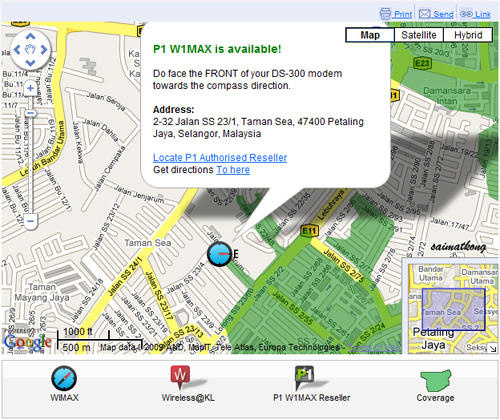
I used the “Am I In Coverage” to search but seems that few road down my house have the coverage but I’m just not in luck. Any chance for them to extend another road to include me in the coverage so that I could enjoy the fun with P1 W1MAX? =(


P1 W1MAX please cover up more area before you expand to other state! If not it’s not very portable as compared to other 3G broadband like Maxis, Digi and Celcom which the coverage is much much wider! Keep it up P1 and I’m confident that you could do it! Why ppl subscribe to P1 W1MAX or other 3G broadband? This is because they want the mobility and if not why in the first place they will subscribe to these service right?
So work on the signal coverage to cover a wider area that supposed wimax could handle and enhance the quality of the speed too and make sure the price is competitive in order to survive in this competitive service. Demand is here but we must make sure the supply is good enough to take care of everyone of the subscriber. =)
Now you can even check your P1 W1MAX coverage thru your phone! Check this if necessary because they did not state the charges of using that service, so do not complain to me later they charge you because of using that =p
Step 1:
Type P1Block NoStreetNameCityPostcode
E.g.: P1 10, Jalan 2/23D,Setapak,53000
Step 2: Send the SMS to 36660.
Step 3: You’ll receive an SMS reply on whether or not your area is in P1 W1MAX coverage.
Posted in Blog | 5 Comments »
Tuesday, May 5th, 2009 3,243 views
Have you subscribed to P1 W1MAX Wiggy? Don’t know how to setup? No worries. It’s very easy with step by step guide.
Step1 : Run the installer

Step 2 : Click Next

Step 3 : Click on the “I accept the agreement” (If not the next button will be disabled) After that click Next.

Step 4 : Choose location to be installed. You can just leave it as default “C:\Program Files\P1\P1 W1MAX” and click Install.


Step 5 : Sit back and relax while eating your pop corn.

Step 6 : Done! And you are set to use your Wiggy! Just wait for it to scan for signal.
Posted in Blog | 4 Comments »
Wednesday, April 29th, 2009 3,007 views
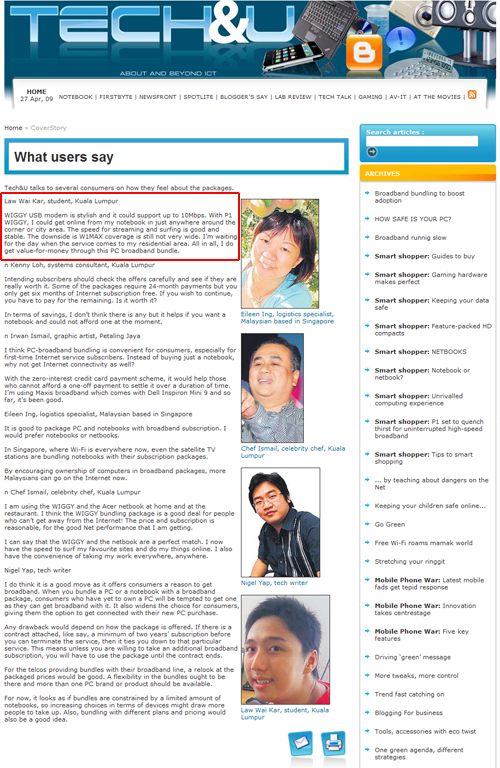
My review about P1 W1MAX WIGGY was out in NST but it was not under my name and not my photo? what happened?

Original review written by me :
WIGGY USB modem is stylish and it could support up to 10Mbps, with P1 WIGGY, we could online in just anywhere around the corner or city area. The downside is W1MAX coverage is still not very wide and waiting for the good news for it to cover my residential area. The speed for streaming and sufing is good and it’s stable.
Review published @ NST
Law Wai Kar, student, Kuala Lumpur
WIGGY USB modem is stylish and it could support up to 10Mbps. With P1 WIGGY, I could get online from my notebook in just anywhere around the corner or city area. The speed for streaming and surfing is good and stable. The downside is W1MAX coverage is still not very wide. I’m waiting for the day when the service comes to my residential area. All in all, I do get value-for-money through this PC broadband bundle.
Click here for the full review on NST.
Although edited some line but it’s still originated from me.
I was surprise when I saw it @ NST. If you were me what will you do? Do not mislead the readers and fast action appreciate to rectify the problem right?
I have contacted the person in charged about this review on Tech & U @ NST, I do get a fast response from her and I was informed that I will be contacted by their corporate communications team but it’s 2 days now and it’s no avail. Hope this matter could be solved as soon as it could and it’s similar case like ShaolinTiger and he did get the apology as it supposed to be.
Posted in Blog | 1 Comment »
Monday, April 20th, 2009 3,422 views

I saw this picture in TheStar newspaper and it’s indeed so ngam, the car plate is also P1. Cool huh? But not related with this P1 launching thingy ler =)
P1 W1MAX Launched @ The Loft…


Wiggylicious Laptop…
(more…)
Posted in Blog, Event | 2 Comments »
Tuesday, April 14th, 2009 4,299 views
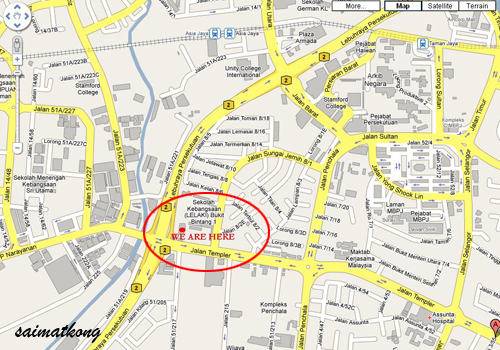
Last week was invited to join P1 W1MAX WIGGY Sneak Preview as a blogger @ P1 Auditorium, Packet Hub, Jalan Templer, before the P1 W1MAX WIGGY Launch @ Upstairs, The Loft. I have no idea where’s the P1 building so I got the google map and managed to get myself there on time! Some of the blogger mention that 7.30pm is very rush from them because some actually work in KL and luck me as I work in PJ hehe.


Wiggy Countdown

P1 Auditorium

Emcee of the day! Using Sony Alpha himself.


P1 CEO Michael Lai, he’s speech was good and he’s very humble too.

Billy Lee presenting the WIGGY…

There’s only 1 thing that you need…


That’s P1 W1MAX WIGGY!


Do you want to WIGGY?

James Chong explaining during Q&A.

Hands on to test Wiggy…

Then all the bloggers were given a chance to test on the WIGGY…

We tested using speedtest.net and only can achieve 0.88 Mbps, maybe that time having some upgrade or something? It say it can go up till 10Mbps.

Explaining on how WIGGY works and answering all the questions that posted by the bloggers and get close to each other.


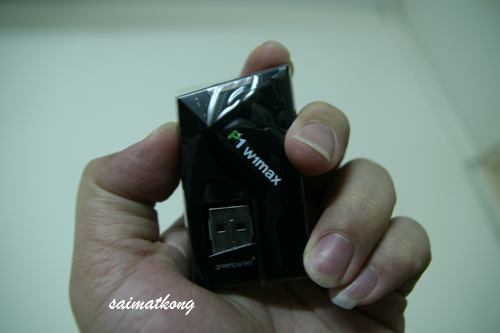
Finally we were given each a WIGGY USB Modem! It’s Sexy…

Then we proceed to M floor for Makan Time, damn hungry ler, that time around 9.30pm+ or so.

Foooood and chat and talk to all the managers and chit chatting and get close to each others and call it a day. =)
Posted in Blog | 2 Comments »
Thursday, April 9th, 2009 3,824 views


Check out the sexy WIGGY USB Modem! It’s small and sleek design. Do you feel sexy?
I’m WIGGYFIED. Will post more details of the gathering and WIGGY Launched @ Upstairs, The Loft, soon. It’s WIGGILIOUS!
Will you WIGGYFIED? What say you?
P1 W1MAX (Wimax Malaysia) WIGGY Special Offer Only @ PC Fair (I) 2009
For Maximum pleasure, take a WIGGY home Today!
Wiggy is tiny. WIGGY is fun. WIGGY is fast wireless broadband in your pocket that goes up to 10Mbps. With WIGGY, it has never been easier to head out and surf anywhere within P1 W1MAX coverage.

RM200 rebate in first month’s bill**

An Acer Aspire One Netbook is yours for FREE when you sign up for WIGGY with P1 W1MAX*
P1 Wiggy USB WiMAX plan – Monthly Fee RM149 (Easy Payment Plan)**, speed up to 10Mbps, 24 Months Contract, WIGGY Portable Modem *** FeeRM299 (upfront payment), Registration RM100 (upfront payment), Activation Fees RM60 (upfront payment), E-billing Free (or RM5 monthly for a paper bill).
*Offer is limited to one netbook per customer, while stocks last. The Acer Aspire One Netbook cannot be returned or refunded. ** RM459 upfront payment can be paid via cash or any credit card. EPP monthly payment of RM149*24 months must be pre-approved by selected banks. *** 2 years warranty. Speeds are on a Best Effort basis. Terms and conditions apply.
Only applicable at PC Fair (I), 2009 in Kuala Lumpur, Johor Bahru and Penang. So grab your WIGGY now! =p
For more PC Fair (I) 2009 Hot Deals or Offer stay tuned or check out the previous post here.
Posted in Blog, Offer | No Comments »