Follow saimatkong @ twitter

MSN – Spam Advert "please get this ringtone / heyy look here ;)"

Sunday, April 27th, 2008 6,812 views

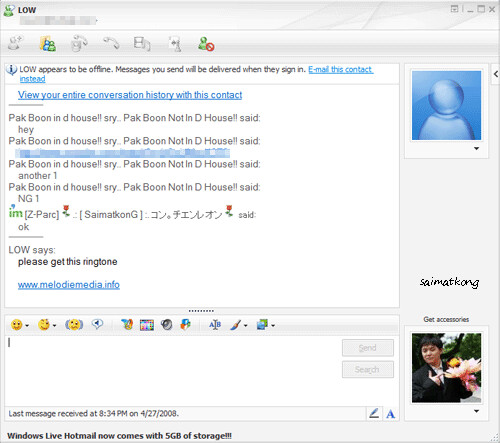
Recently, again I receive spam message from MSN.

Your Friend says:
please get this ringtone

www.melodiemedia.info

Please get this ringtone, www.melodiemedia.info

It will redirect you to
(more…)

Want to know who deleted / blocked you from MSN? – MSN Email Virus, Trojan, Spyware

Monday, March 31st, 2008 36,330 views

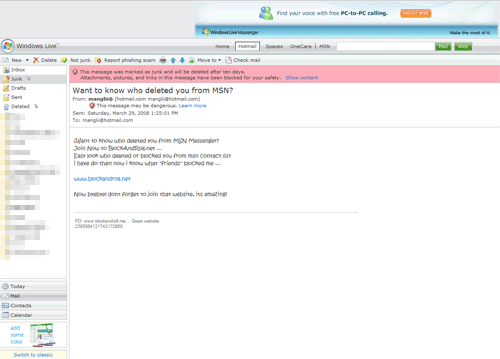
Wow, it doesn’t only send thru MSN Messenger, now it spread thru email too. I just receive this email from mangohean@hotmail.com, XXX@hotmail.com, so do you think I will ever click and check who deleted me or even who blocked me? Why should I care. Those who deleted me or blocked me, I would think that they don’t want to chat or be friend with me so why should I care and want to find out who deleted or blocked me from MSN? Why should you too?

Think carefully and do not simply click on the link others send you until you confirm with them that it’s valid and it’s authenticate.

It’s another kind of MSN Virus or MSN Trojan or even MSN spayware?

MSN Email Virus

Want to know who deleted you from MSN Messenger?
Join Now to BlockAndRoll.net …
Easy look who deleted or blocked you from msn contact list
i have do that! now i know what “friends” blocked me …

www.blockandroll.net

Now byebye! dont forget to join that website, its amazing!

MSN Email Virus

hello;

i found a website. you can check who blocked you on MSN. And all Free. Visit this website

Addreess:

http://www.blockcontroller.com/

hello;

i found a website. you can check who blocked you on MSN. And all Free. Visit this website

Addreess:

http://www.blckravustrllyy.com/

I have just logged with my hotmail to www.muymsn.com that is a website where you can find WHO DELETED YOU from the MSN Messenger.
It´s incredible to find out that trusted friends deleted you
You might find out the same!!
Check it at www.muymsn.com

muymsn.com

Check on my previous post about MSN Messenger Spread Virus By URL Link and MSN Messenger Virus which spread virus by sending you pictures or photo zip or rar files.

MSN Messenger Virus

Monday, November 5th, 2007 57,209 views

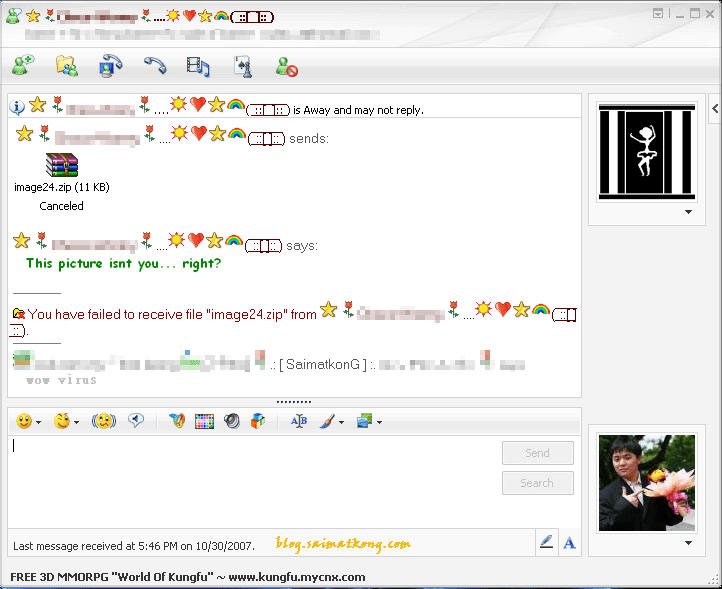
Recently a lot ppl attacked by MSN Virus/Worms/Trojan which send you a zip file telling you that it’s the picture that they took together with you or telling you that it’s their latest picture and with some message which make you think that it’s actually send from the user from your contact.

Do not accept it unless you know it’s for real and be sure that you ask some question and check if the response is by the contact or auto response. You will definitely know it. Once you accept the file that’s actually a virus, it will reside on your computer and keep sending to other person in your contact list so that others will be infected too. So don’t be the one who spread virus. Be smart!

I myself have receive a lot of this photo album zip from my contact but I know it’s a virus so I will just tell my friend on my contact to act accordingly to remove the stupid and annoying virus which will keep on infecting the contacts in your msn messenger.

example:

HEY lol i’ve done a new photo album !:) Second ill find file and send you it.

Hey wanna see my new photo album?

Hey accept my photo album, Nice new pics of me and my friends and stuff and when i was young lol…

Hey just finished new photo album! :) might be a few nudes ;) lol…

hey you got a photo album? anyways heres my new photo album :) accept k?

hey man accept my new photo album.. :( made it for yah, been doing picture story of my life lol..

Msn Messenger Virus
Msn Messenger Virus

How to remove this msn virus/worms/torjan?
Some of the know virus.
- Backdoor.Win32.IRCBot
Backdoor.Win32.IRCBot is a computer worm/backdoor that is spread through MSN Messenger and Windows Live Messenger by downloading photo album.zip from someone.

How to remove it 1
How to remove it 2

- IM-Names

- cute.pif

- PIC1234(1)(1)(1)(1)(1)(1).exe

- Choke.exe

- W32.Aplore@mm

If you are infected by other virus very simple, just follow the steps below.
1) You need to scan and detect the virus name before you can proceed to clear the virus.
2) Get the virus name and google the guide to remove the particular virus.

So be safe better than sorry. Don’t accept file that look suspicious to you.

About Me

Here I'll share my knowledge, discovery and experience related to latest news, gadgets and happening stuffs. Most articles on this site are related to IT, short reviews, tips and latest offers and many more. More

Want to subscribe?

 Subscribe in a reader Or, subscribe via email:
Enter your email address:  
Google