
Follow saimatkong @ twitter

The iPad Gets A Facebook App Finally! Also Updated iPhone Version

Wednesday, October 12th, 2011 581 views

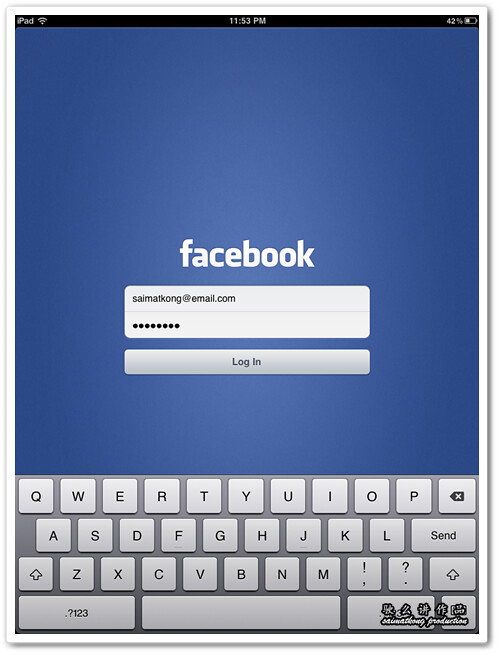
The most obvious app missing from the iPad has been Facebook and finally it’s released! I have installed into my mom’s iPad and the user experience is really awesome!

This Facebook app for iPad also support Multi-Touch Gestures! The new Facebook app for iPad really highlight the multitouch awesomeness of the iPad!

Facebook for iPad

Take Tour

When you first login to the Facebook for iPad app, you can choose to Take Tour on how to use the app.

Navigate

Menu

Search

Facebook profile

Navigation sidebar

There’s a navigation sidebar on the left side of the screen to search, open your Facebook profile, check out the News Feed, Messages, Events, Friends and more.

Messages

Notification

Notification

Upper toolbar gives you access to friend requests, messages and notifications while your news feed is still on the background! You will not loose where you checking on the feed that you are reading halfway! That’s the best part that I love!

Enjoy bigger, better photos

Enjoy bigger, better photos

Your photos take on new life on the iPad. They’re big, high-res and easy to flip through—like a real photo album.

Enjoy bigger, better photos

When you search for your friends, the profile photo of your friends also bigger and look very organize and awesome!

Focus on what matters

With less on the screen, it’s easier to zoom in on your friends’ photos, updates and stories.

Navigate anywhere, fast

Just tap, slide or pinch to get from one screen to another and back again in no time.

Never lose your place

Use simplified navigation to send a message, see your notifications or browse your bookmarks without switching screens.

Play games on the go

Play your favorite Facebook games wherever you are, and on a bigger screen.

Tap to send messages

A simple dropdown menu makes it easy to scan and send messages without visiting your inbox.

Add multiple Facebook accounts or profile

You could also add multiple Facebook accounts / profiles into the Facebook for iPad app so you could switch between the profile easily.

Download the new Facebook for iPad app now! A New Way to Experience Facebook!

Please Take note!

Problem : The Facebook iPad app might crash or takes a long time to load when you first open the new Facebook iPad app. Don’t worry!

Solution : I kill the running Facebook app and run the app again few times and can load without any problem. Or you may delete the Facebook app on your iPad and reinstall.

Nice One! Win Private Party Invites With FHM Girl Next Door!

Thursday, December 17th, 2009 2,780 views

Hey people, Christmas is coming… Wee ~

I have something for you as your X’mas present. Some tips for you so that you could win youself something this new year.

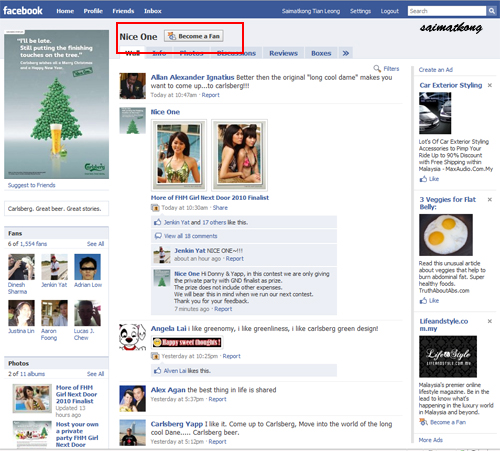
1. Become a fan of Carlsberg on facebook at this link : http://www.facebook.com/CarlsbergNiceOne

Become Nice One Fan
Click on the “Become a Fan” button.

2. Add the application and start decorating the Carlsberg Christmas tree. http://apps.facebook.com/carlsbergxmastree/

Add Nice One App
Click on the “Allow” button.

Carlsberg Nice One Application

taaa daaa… You have got yourself a nice x’mas tree. Now there’s a mission for you! Get into the spirit of Christmas and start decorating your tree by turning your friends into Christmas trinkets and win yourself a special invites to special events and you get to invite 50 of your friendsss too with unlimited free flow of beer. Sound cool? Of coz la! Read on…

4 Simple Steps

Just 4 Simple Steps:

1.) Choose a Friend & Choose your friend’s photo that available in Facebook.

Choose a friend
Choose a friend that you would like him / her to be in your X’mas tree.

Choose a photo
Choose your friend’s photo that available in Facebook.

2.) Choose a Trinket

Choose a Trinket
Choose a trinket that you think is best fit your friend.

3.) Adjust and fit his/her face onto the trinket

Adjust and fit his/her face onto the trinket
Try to rotate and scale your friend’s face into the trinket.

4.) Hang your trinket on your Carlsbery Christmas Tree

Hang it on christmas tree

Hang it on christmas tree
Then just hang it on your X’mas Tree by dragging your friend’s trinket on to the allocated space on the X’mas Tree.

Completed

Completed and you may also publish this to your friend’s wall so that they know you actually hung him / her on your Tree. =)

Publish story to facebook wall

Then you are done. Hmm wait… actually not till you hang all your friends to your special Nice One Tree~!

If you have the most friends on your Carlsberg x’mas Tree, you stand a chance to win your own private party, Yes “Private Party” at a place with unlimited free flow of beer and of coz with the FHM GIRL NEXT DOOR! Nice one right? =)

Celebrate this Christmas in a whole new way! Put up a Carlsberg Christmas Tree and have fun decorating it by turning your friends into Christmas trinkets! And if you’ve put up the largest tree, you may even win your very own sponsored Christmas party. Alright, catch up again as I’m busy building my Nice Tree.

About Me

Here I'll share my knowledge, discovery and experience related to latest news, gadgets and happening stuffs. Most articles on this site are related to IT, short reviews, tips and latest offers and many more. More

Want to subscribe?

 Subscribe in a reader Or, subscribe via email:
Enter your email address:  
Google