
Tuesday, November 10th, 2009 76,694 views
Grab your Xpax BlackBerry Curve 8520 Apps, Themes & Wallpaper here.
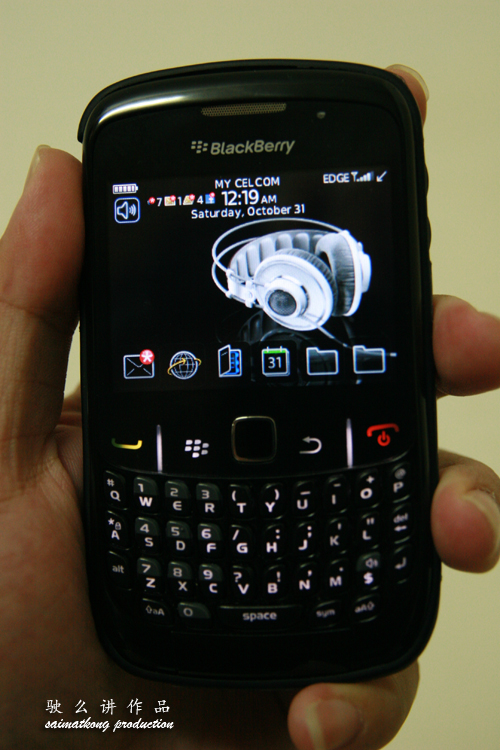
I have been using my Xpax BlackBerry Curve 8520 for almost a month and it’s been a good experience! I’m proud that I actually inspired some of my friends and readers to get this BB! They told me that I actually influence them about this BlackBerry, at 1st they don’t want to get but in the end grabbed 1 after reading so many benefits and all from the Xpax BIS Package. =p
Here’s the screen shot that a reader sent me. (Capture It)

Must Have Application :
1.) UberTwitter – Twitter
2.) MSN Messenger – Instant Messaging
3.) Gmail App – Gmail Application
4.) Google Maps – GPS/Mapping (Using your cell location coz BB Curve 8520 don’t have GPS.)
5.) Google Sync – Sync Device & Google Calendar
6.) Google Talk – Instant Messaging
7.) Facebook – Social Networking
8.) Blackberry App World – Blackberry App World (Having trouble install BlackBerry App World? Download from here then you able to install App World if not you can’t coz different country and all.)
9.) Quick Pull – Simulate Battery Pull (You can make your bb reboot and free memory)
Get your free wallpaper here : http://crackberry.com/wallpaper/by/320×240
The two theme that I’m using…


Get your free theme here :
1) blackberryseeker.com
2) crackberry.com
3) coolblackberrythemes.com
4) blackberrythemes.net
5) blackberrythemes.co.uk
Saw some nice theme but still not available for BlackBerry Curve 8520 =(
Posted in Mobile | 30 Comments »
Thursday, November 5th, 2009 3,844 views

What is BlackBerry Messenger?
BlackBerry Messenger is simply an instant messaging program for BlackBerry to BlackBerry communication. It allows two people with BlackBerrys to chat in real time anywhere in the world so long as they have data service. With BlackBerry Messenger there is no per message charge like there is with SMS, messages are sent through RIM servers similar to email messages. It’s absolutely free, so BlackBerry user can start to chat like there’s no tomorrow.
Start talking with BlackBerry Messenger
1. The first time you log into BlackBerry Messenger, you’ll be prompted to create a display name and password.
2. Once your display name and password are created, you’ll log into BlackBerry Messenger automatically each time your BlackBerry smartphone is connected to a wireless network.
Start using BlackBerry Messenger

- Add a contact:
o By scanning a barcode: on the contact list screen, press the Menu key. Click Invite Contact, then click Scan a person’s barcode. Click Continue. Hold your smartphone so all four corners of the barcode appear on your screen. Continue to hold your smartphone until you hear the success beep.
o By typing an email address or PIN: on the contact list screen, press the Menu key. Click Invite Contact, then click Enter a person’s email address, PIN or name. Type all or part of the contact information. Click the contact information. Change the Send Using and Category fields if necessary. Click Send.
o That uses text messaging1: on the contact list screen, press the Menu key. Click Invite Contact, then click Enter an SMS contact’s name or phone number. Type all or part of the contact information. Click the contact information. Change the Category field and type the name you want to appear in your BlackBerry Messenger contact list if necessary. Click Add Contact.
- Start a chat: on the contact list screen, in a contact category, click a contact. Type a message, then press the Enter key.
- Start a new group chat: on the contact list screen, in the BlackBerry Groups category, click a group. Click Chats. Press the Menu key, then click New Chat. Type a subject for the group chat. Click Create.
- Send a file to a contact: during a chat, press the Menu key, then click Send File:
o Send a picture: click Picture. Click Camera or File. Take a picture or click a picture. Type a caption if necessary. Click Send.
o Send a document: click File. Click a file.
o Send a voice note: click Voice Note. Click Start to record your message. Click Stop if necessary. Click Send.
o Send a contact attachment of a contact from the contacts application: click BlackBerry Contact. Click a contact.
o Send a contact attachment of a BlackBerry Messenger contact: click Messenger Contacts. Click one or more contacts. Click OK.
Update or download the new and latest version of BBM v5 now!
Check out the User Guide
Posted in Mobile | No Comments »
Saturday, October 31st, 2009 8,074 views
Enjoying your Xpax BlackBerry? Do you know what’s the light blinking in your BlackBerry for? Here is a quick guide and tips to the BlackBerry LED indicators.


Blue – Blue is for Bluetooth.
A flashing blue light indicates an active connection via bluetooth. You could enable/disable this feature under “Options > Bluetooth > Menu > Options > LED Connection Indicator: On/Off”
Green – Green is for coverage indicator.
Who really wants to be continuously reminded they are in a service area? I definitely don’t need this, it’s a waste of your batt if it’s blinking all days! Anyway it’s off by default! You could enable/disable this “feature” under “Options > Screen/Keyboard > LED Coverage Indicator On/Off”
Red – This is the good one! A flashing red light indicates a new message is waiting. Check under your messages folder for any unread items.
You can choose to be notified of new messages visually under “Profiles > Advanced > [Select profile you wish to modify] > [Select message the application that you wish to modify on how's the notification] > Repeat Notification : LED Flashing/Off”
Yellow – Yellow indicates that you are running out of battery. Find a charger quickly!
No Light – Nothing happen la! duh. Haha.
Posted in Mobile | 4 Comments »
Wednesday, October 21st, 2009 4,558 views

Love my BlackBerry Curve 8520 so much!


Xpax + BlackBerry Curve 8520 can do wonders!


Package Include :
1 Charger
1 USB Cable
1 Battery
1 Handsfree
1 2GB microSD
It’s a good phone and I really like that track pad compared to track ball, I tested the track ball with my friend’s BlackBerry Bold not so sensitive and the ball will be dirty and need to be replace. The camera is 2.0 Mega Pixel without any flash or LED light, it’s best to take in bright lighting condition. The download speed is still bearable at 128kbps with Xpax BlackBerry Social RM1 or Advance RM2.50 plans, sometimes it might takes awhile to load.
The lacking features in this phone is just 3G (no video calls and only using EDGE or GPRS connection) and GPS. Overall this is a good entry level phone looking at the price and it worth every cent that you paid for. I need to re-charge my BlackBerry everyday due to high usage and can’t leave without it! =)
Free apps that you might interested for your BlackBerry Curve 8520 : -
- Google Sync
- Google Gmail For Mobile
- Google Map
- UberTwitter
- Facebook version 1.7
- MSN Messenger
- BBM Version 5 (New version)
For other free apps, theme, or ringtone, etc go to http://m.crackberry.com/, if you know any better apps then please let me know too so that we could share share and enjoy most out of this BlackBerry.
Posted in Mobile | 1 Comment »
Monday, October 5th, 2009 1,523 views

When, Where, Who, How, Why?
Date : 10 October 2009 (Saturday)
Time : 8pm till late
Venue : Republic, Sunway Pyramid
Highlights : Special performances by Joe Flizzow, Arabyrd, Lapsap(Xu) and Twilight Action Girl
Dress code : Party chic
Besides that, there will also be promotions on that night itself that not to be missed :
- BlackBerry Curve 8520 smartphone at RM888 (RRP: RM1188)
- FREE 1 month BlackBerry prepaid access
- FREE limited edition designer skin (exclusively designed by Lapsap, TAG, Black Fryday, Yayawoo & Bangkit)
- FREE leather holster or car charger
- Free drinks vouchers
You’re able to collect your BlackBerry 8520 smartphone on the spot! There’s amazing lucky draws too.
Party invites will be sent exclusively to the discerning ones who pre-registered for their BlackBerry Curve 8520 smartphone. So pre-register yourself now to enjoy all the benefits.
Posted in Mobile | No Comments »
Wednesday, September 16th, 2009 1,327 views

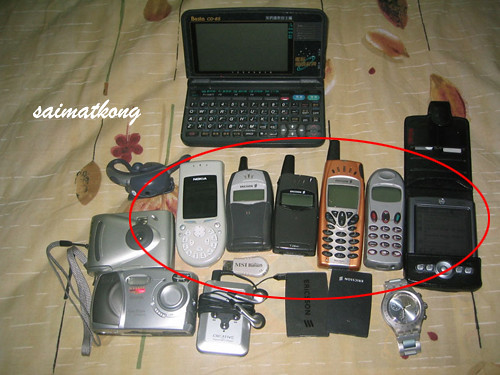
See this is all my old phone which is not “so smart” back then. Where’s my BlackBerry? When I see ppl using BlackBerry on the go, I so jealous-nya.
I’m waiting for the all new BlackBerry Curve 8520 from Xpax and it’s the easiest way for cell phone users like me to adapt on BlackBerry smartphone. It has a Full QWERTY keyboard, so that I can type SMS and email much faster and yeah time saving = $ saving!

The BlackBerry Curve smartphone simplifies the decision to buy a smartphone. BlackBerry Curve 8520 has a nice and friendly design that comes from a trusted brand with a reputation for world class, reliable products. It’s easy to use and it’s affordable, so that explain why…
Pre-register by simply filling out your details and you’ll get to be the first to enjoy exclusive deals, freebies and more coming your way soon!
Posted in Blog | No Comments »
Saturday, September 12th, 2009 4,674 views
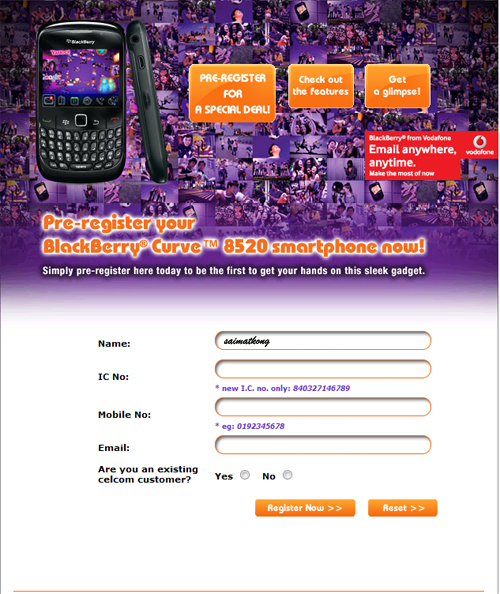
Have you pre-register your BlackBerry Curve 8520? I will show you how to do it. It’s very simple and just with a few steps to go and you are done.
1st go to : http://www.xpax.com.my/blackberry/reg_file/order.php

Just fill in your Name, IC, Phone Number, Email and select whether existing customer or not. Then you are done! Simple right?
After you click on the “Register Now >> ” button your information will be captured and you will be updated with latest info from xpax.
Thank you for pre-registering with us.
You’re now one step closer to getting your own BlackBerry® Curve™ 8520 smartphone.
Remember to join Xpax on Facebook or keep checking out our website for more updates and news!
Posted in Automotive, Blog | No Comments »
Thursday, September 10th, 2009 3,857 views
Xpax, the 1st prepaid plan to introduce this sleek BlackBerry® Curve™ 8520 smartphone.

With the introduction of the latest BlackBerry® Curve™ 8520, staying in touch with family and friends and work is made so easy. It’s the power in your hand anytime, anywhere, and it gives you the ability to enjoy the ultimate communications experience. Do you love MSN, Facebook, and email on the go? If yes then it’s definitely your kind of phone!
You can now pre-register your BlackBerry® Curve™ 8520 here http://bit.ly/20HbB before September 25.
Stay tuned for more information, specification and price rate of this Xpax BlackBerry Curve 8520 package.
Posted in Blog | 2 Comments »