
Tips – BlackBerry LED Status Light Indicator
Posted By Saimatkong on Oct 31, 2009 | 4 comments 19,651 views
Enjoying your Xpax BlackBerry? Do you know what’s the light blinking in your BlackBerry for? Here is a quick guide and tips to the BlackBerry LED indicators.

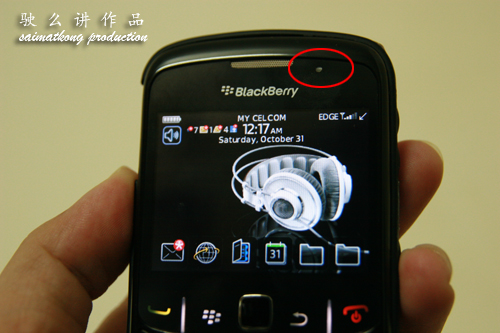
Blue – Blue is for Bluetooth.
A flashing blue light indicates an active connection via bluetooth. You could enable/disable this feature under “Options > Bluetooth > Menu > Options > LED Connection Indicator: On/Off”
Green – Green is for coverage indicator.
Who really wants to be continuously reminded they are in a service area? I definitely don’t need this, it’s a waste of your batt if it’s blinking all days! Anyway it’s off by default! You could enable/disable this “feature” under “Options > Screen/Keyboard > LED Coverage Indicator On/Off”
Red – This is the good one! A flashing red light indicates a new message is waiting. Check under your messages folder for any unread items.
You can choose to be notified of new messages visually under “Profiles > Advanced > [Select profile you wish to modify] > [Select message the application that you wish to modify on how’s the notification] > Repeat Notification : LED Flashing/Off”
Yellow – Yellow indicates that you are running out of battery. Find a charger quickly!
No Light – Nothing happen la! duh. Haha.



November 16, 2009
when i disable the continuous blinking feature under “Options > Screen/Keyboard > LED Coverage Indicator On/Off”, it won’t notify me missed calls by this LED, right? only notify me with messages right?
November 16, 2009
that indicator is for coverage meaning if there’s coverage then it will blink but nothint to do with missed call…
August 16, 2011
my led coverage indicator does not blink,actually i choose the message application to modify but it does’nt work..
August 17, 2011
try to restore maybe some apps corrupt if not go check with the phone shop.